South Hero Mass Photo Prompt 2026 | Viral Cinematic AI Photo Editing Prompt
Introduction
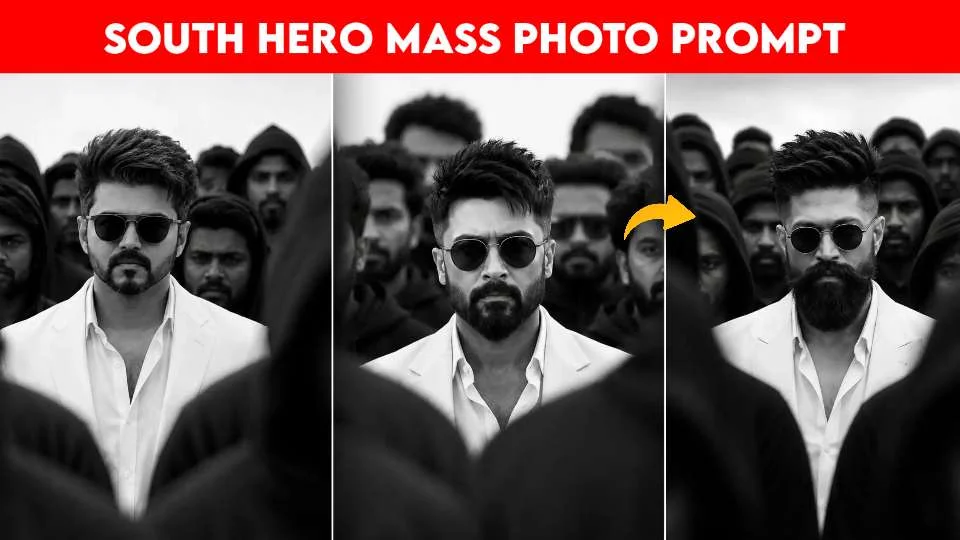
South Indian movie heroes are known for powerful screen presence, stylish looks, strong poses, and dramatic movie scenes. This style has also become popular in AI photo editing. With the right South Hero Mass Photo Prompt, you can turn a simple photo into a powerful cinematic image that looks like a movie scene.
You do not need a movie set, expensive camera, or professional photographer. You only need a clear photo and a good AI prompt. You can upload your photo to an AI image tool and tell it how you want the scene to look. Also see: Viral Red Background AI Photo Editing Prompts ChatGPT 2026
You can create a mass hero look with a stylish outfit, dramatic lighting, slow-motion-style pose, powerful background, smoke, dust, luxury cars, crowds, or a dramatic city location. You can also choose a village, street, festival, or action-style setting.
The goal is to create a cinematic South Hero Mass Photo while keeping your face and natural identity recognizable.
In this guide, you will find the best South Hero Mass prompts, five ready-to-copy prompts with visual inspiration, easy steps to use them, the best AI tools, useful tips, common issues, and FAQs.
What Is a South Hero Mass Photo Prompt?
A South Hero Mass Photo Prompt is a text instruction that tells an AI image tool to create a powerful, stylish, and cinematic hero-style photo.
The word “mass” is often used for a bold movie style. It can include a strong pose, dramatic lighting, a stylish outfit, a powerful background, and a confident expression.
You can use a prompt to create different scenes, such as:
- A hero walking through a crowd
- A powerful street portrait
- A cinematic village scene
- A luxury car scene
- A rainy night scene
- A dramatic sunset
- A festival background
- A stylish action-style scene
- A slow-motion-inspired walking pose
- A movie-poster look
For the best result, your prompt should clearly explain the subject, clothes, pose, background, lighting, camera style, and mood.
For example, instead of writing:
“Make me look like a hero.”
You can write:
“Transform my uploaded photo into a powerful South Indian movie-inspired hero portrait with a confident walking pose, stylish black outfit, dramatic sunset, dust in the air, cinematic lighting, and a large crowd in the background.”
This gives the AI more useful information.
Why Is the South Hero Mass Photo Trend Popular?
The South Indian film industry has a strong visual style. Hero introductions often use dramatic locations, powerful poses, stylish outfits, strong music, large crowds, and impressive camera shots.
These elements are perfect for AI photo editing because you can describe them in a prompt.
Another reason this trend is popular is social media. People enjoy sharing dramatic and creative photos that look different from normal portraits. A cinematic hero image can make your profile or social media post more eye-catching.
AI tools also make the editing process easier. You do not need to rent a location or arrange a large group of people. You can ask an AI tool to create the scene around your uploaded photo.
You can also create different versions of your photo. One prompt can give you a village hero scene, while another can create a city action scene.
The style is also easy to customize. You can choose your own clothes, car, background, lighting, and mood.
Best South Hero Mass Photo Prompts
Below are five ready-to-use prompts. You can copy and paste them into a suitable AI image editing tool.
For a better result, start with a clear photo where your face and body are visible.
5 South Hero Mass Photo Prompts With Images
1. Powerful Hero Walking Prompt
Copy and paste this prompt:
Image idea: A hero walking toward the camera with a crowd behind him, dust in the air, and dramatic sunlight.
2. Mass Hero With Luxury Car Prompt
Copy and paste this prompt:
Image idea: A confident hero standing beside a black luxury car with a dramatic city background.
3. Village Mass Hero Prompt
Copy and paste this prompt:
Image idea: A hero walking through a village street with people behind him and warm golden sunlight.
How to Use South Hero Mass Photo Prompts
Using these prompts is easy. You can follow the steps below.
Step 1: Choose a Clear Photo
Start with a high-quality photo. Your face should be clear and your body should be visible if you want a full-body hero scene.
Avoid very blurry photos or images where your face is covered.
Step 2: Select an AI Tool
Choose an AI image editing tool that supports photo uploads.
Upload your original photo.
Step 3: Copy the Prompt
Select your favorite prompt from this guide and copy it.
Paste the prompt into the AI tool and start the generation or editing process.
Step 4: Add Your Own Details
You can make the prompt more personal.
For example, you can add:
- Your favorite outfit
- A black car
- A village background
- A city street
- Rain
- Sunset
- A large crowd
- Smoke
- Dust
- Sunglasses
- A luxury watch
Step 5: Check the Final Image
Look carefully at your face, hands, clothes, car, crowd, and background.
If anything looks wrong, ask the AI to fix that part and generate another version.
Best AI Tools for South Hero Photo Editing
ChatGPT
ChatGPT can help you create detailed image prompts and, where image editing is available, work with uploaded photos. You can explain your desired hero style, background, outfit, lighting, and mood.
Google Gemini
Gemini can also help with AI image creation and editing. You can upload your photo and describe the cinematic changes you want.
Adobe Firefly
Adobe Firefly offers AI creative tools that can help you create or change backgrounds, lighting, and other visual elements.
Midjourney
Midjourney can be useful for creating cinematic concepts and dramatic visual scenes. It is especially useful when you want creative backgrounds and strong visual styles.
Canva
Canva is useful when you want to turn your AI-generated hero photo into a poster, social media post, thumbnail, or other design.
Tips and Tricks for Better Results
Use a High-Quality Photo
The better your original photo is, the easier it is for the AI to create a good result.
Use a clear photo with good lighting.
Keep Your Face Natural
If you want to keep your identity recognizable, add:
Keep my original face, facial features, hairstyle, skin tone, and identity unchanged.
Describe Your Outfit
Do not only say “hero outfit.” Explain what you want.
For example:
“Wear a black shirt, black trousers, premium shoes, sunglasses, and a luxury watch.”
Add Cinematic Lighting
Lighting can make your hero photo much stronger.
Try:
- Golden sunlight
- Dramatic backlighting
- Side lighting
- Sunset light
- Neon lighting
- Rainy night lighting
Use a Strong Pose
A confident pose can make the photo feel more powerful. You can ask for a walking pose, standing pose, arms-crossed pose, or a confident look toward the camera.
Do Not Add Too Many Effects
Too much smoke, fire, dust, or lighting can make the photo look fake. Use effects carefully.
Try Multiple Versions
Your first image may not be perfect. Try small changes to the prompt until you get the result you like.
Common Issues With AI Hero Photos
The Face Looks Different
AI can sometimes change your facial features. Add a clear instruction to preserve your original face and identity.
Hands Look Strange
AI-generated hands can sometimes look unnatural. Try a simpler pose or ask the AI for realistic hands and natural proportions.
The Crowd Looks Fake
Large crowds can be difficult for AI. Ask for a realistic distant crowd with natural body proportions and soft background blur.
The Car Looks Wrong
If you add a car, AI may change its shape or details. Ask it to create a realistic car with correct proportions and natural reflections.
The Image Is Too Dark
If your photo becomes too dark, add:
Use balanced cinematic lighting and keep the face clearly visible.
The Photo Looks Too Artificial
Add phrases such as:
photorealistic, natural skin texture, realistic proportions, natural lighting, professional photography.
Conclusion
A South Hero Mass Photo Prompt can help you create a powerful and cinematic image from a simple photo. You can create a hero walking through a crowd, standing beside a luxury car, walking through a village, standing in the rain, or appearing in a dramatic movie-poster scene.
The key is to give the AI clear instructions. Tell it about your clothes, pose, location, lighting, background, and mood. At the same time, ask it to keep your original face and identity natural.
The five prompts in this guide are a great starting point. You can copy one, upload your photo, and then change the details to match your own style.
You can also experiment with different locations, outfits, cars, lighting, and cinematic effects. With a little testing, you can create a bold hero-style photo that looks dramatic, stylish, and ready for social media.
FAQs
What is a South Hero Mass Photo Prompt?
A South Hero Mass Photo Prompt is a text instruction that helps an AI image tool create a powerful, stylish, and cinematic hero-style photo.
Can I use my own photo?
Yes. You can upload your own clear photo to an AI image tool that supports photo editing.