Sheru Bhai AI Photo Editing Prompt 2026
AI photo editing trends are becoming more popular on Instagram, Facebook, and other social media platforms. One of the interesting trends is the Sheru Bhai AI Photo Editing Prompt. This trend lets you create stylish, funny, and cinematic photos using AI image editing tools.
You do not need professional photography skills or expensive editing software. Simply upload your picture, copy a prompt, and let an AI tool create your desired look. Also see more prompts from ai photo prompts
In this article, you will find the best Sheru Bhai AI photo editing prompts for Google Gemini and ChatGPT. You can try different poses, outfits, backgrounds, and cinematic effects to make your photos stand out.
What Is Sheru Bhai AI Photo Editing?
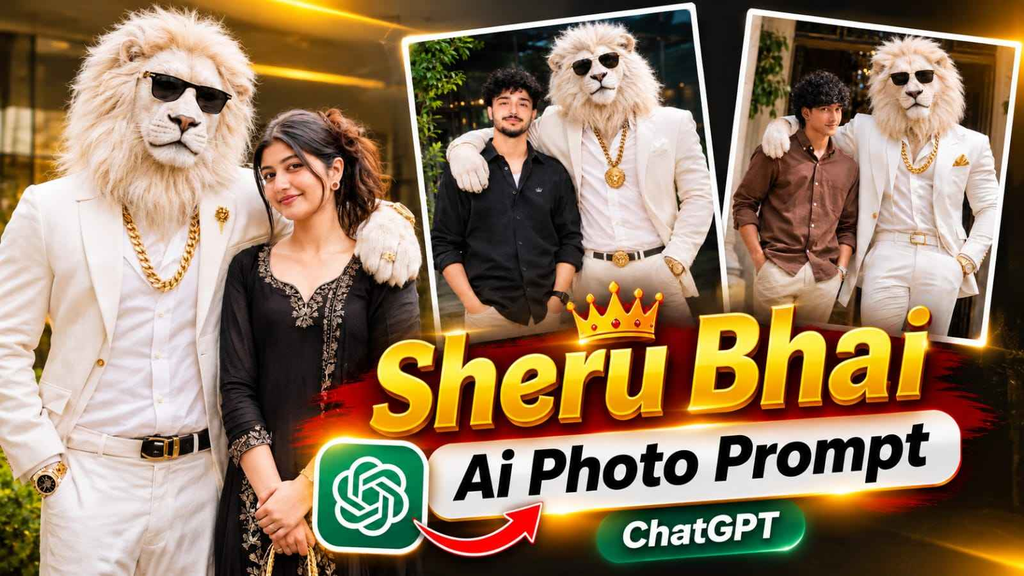
Sheru Bhai AI Photo Editing is a creative photo editing trend where users create Sheru Bhai-inspired portraits with the help of AI tools.
You can create different styles, such as powerful gangster-style portraits, luxury car photos, village looks, stylish black outfits, and cinematic street photography.
The best part is that you can use your own photo as a reference and customize the final result according to your choice.
Sheru Bhai AI Photo Editing Prompts 2026
There are some trending prompts you can copy and use with your reference photo.
1. Viral Sheru Bhai Cinematic Look
Prompt:
2. Sheru Bhai Luxury Car Look
Prompt:
3. Sheru Bhai Black Outfit Portrait
Prompt:
4. Sheru Bhai Village Style Photo
Prompt:
How to Create Sheru Bhai AI Photos Using Google Gemini
Follow these easy steps to create your own viral-style AI photos.
- Open Google Gemini on your mobile or computer.
- Upload a clear picture of yourself.
- Select any Sheru Bhai AI photo editing prompt from this article.
- Copy the prompt and paste it into Gemini.
- Ask Gemini to generate your edited photo.
- Wait for the image to finish generating.
- Save your favorite result and share it on social media.
Important Tip: Always upload a clear front-facing picture for better facial consistency. AI-generated results may vary depending on the reference image and tool settings.
Tips to Get Better Sheru Bhai AI Photo Results
- Use a high-quality reference picture.
- Choose prompts with clear outfit and background descriptions.
- Keep your original facial features in the instructions.
- Try different poses to create unique photos.
- Use cinematic lighting for a professional appearance.
- Avoid adding too many effects to your image.
Why Is the Sheru Bhai AI Photo Trend Popular?
AI photo editing makes it easy to experiment with different photography styles. People enjoy creating powerful portraits, luxury car photos, stylish outfits, and cinematic backgrounds without arranging a real photoshoot.
The Sheru Bhai-inspired look is especially suitable for social media posts, profile pictures, and entertaining AI photo collections.
Frequently Asked Questions (FAQs)
1. What is the Sheru Bhai AI Photo Editing Prompt?
It is a text instruction that helps AI tools create Sheru Bhai-inspired photos with cinematic backgrounds, stylish outfits, and confident poses.
2. Which AI tool can I use for Sheru Bhai photo editing?
You can try Google Gemini or ChatGPT image generation to create AI portraits using your reference photo.
3. Can I create Sheru Bhai photos with my own face?
Yes. Upload your own picture and include instructions to preserve your original facial features and identity.
4. Are Sheru Bhai AI photo prompts free?
The prompts shared in this article are free to copy and use. However, AI image generation may have free usage limits depending on the platform.
5. Can I share Sheru Bhai AI photos on Instagram?
Yes. You can share your generated portraits on Instagram, Facebook, WhatsApp, and other social media platforms.
Final Words
The Sheru Bhai AI Photo Editing Prompt trend is a fun way to create stylish and cinematic portraits. Use these prompts with Google Gemini or ChatGPT, try different looks, and create unique AI photos using your own pictures.