15 ChatGPT Prompts for Chilling Halloween Photos
Want to give your photos a spooky Halloween look? These ChatGPT prompts can help you create dark, creepy, and stylish Halloween edits. You can use them to make portraits, haunted scenes, pumpkin photos, and more.
What Is 15 ChatGPT Prompts for Chilling Halloween Photos?
These are ready-to-copy prompts for creating Halloween-style images with AI. You can add your own photo and change details like clothes, lighting, background, and mood.
Why Is It Trending?
Halloween edits are popular on social media because they make normal photos look creative and eye-catching. AI tools also make it easy for beginners to try different Halloween styles.
Best Prompts
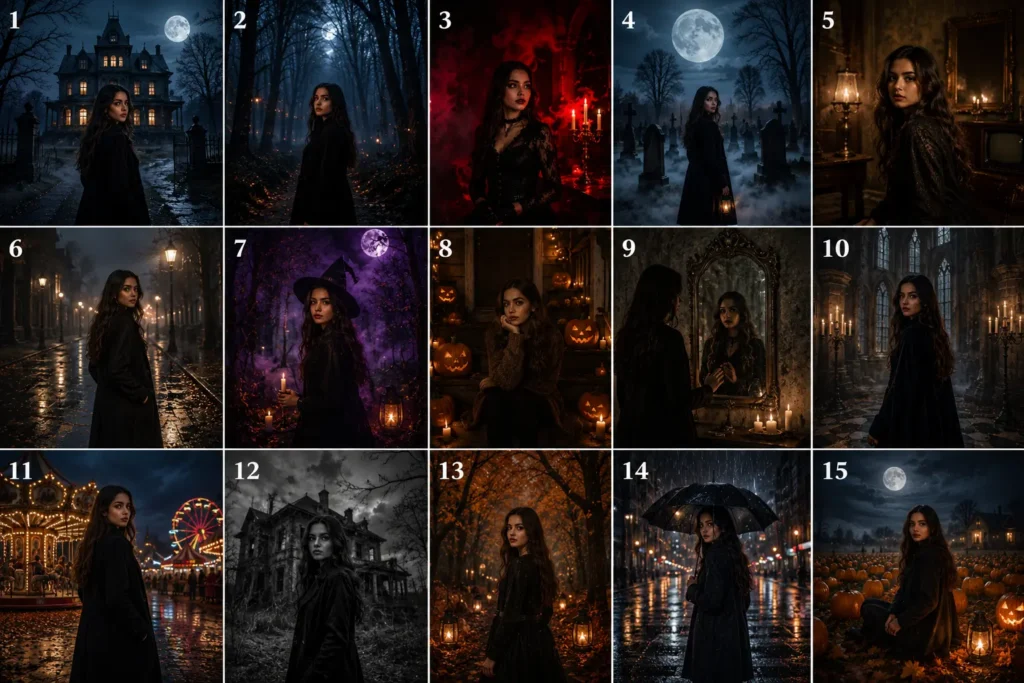
1. Haunted House
“Turn my photo into a spooky Halloween portrait outside an old haunted house at night. Add fog, a full moon, bare trees, glowing windows, dramatic shadows, and realistic cinematic lighting. Keep my face natural and recognizable.”
2. Dark Forest
Prompt:
“Edit my photo into a mysterious Halloween scene inside a dark forest. Add twisted trees, moonlight, soft fog, falling leaves, and deep shadows. Keep my face and body realistic.”
3. Gothic Style
“Create a stylish gothic Halloween portrait from my photo. Add black and red tones, candles, smoke, dark clothing, and dramatic side lighting. Keep my facial features natural and realistic.”
What it does: Gives your photo an elegant gothic look.
4. Moonlit Graveyard
“Place me in an old cemetery under a large full moon. Add aged gravestones, light fog, bare trees, and realistic moonlight. Keep my face, body, and pose natural.”
What it does: Creates a spooky cemetery scene.
5. Vintage Horror
Prompt:
“Turn my photo into a vintage Halloween horror portrait. Add an old room, candlelight, soft film grain, dark shadows, and faded colors. Keep my face realistic and recognizable.”
What it does: Gives your photo an old horror-film style.
6. Foggy Street
Prompt:
“Place me on a quiet street at night with thick fog, old buildings, dim street lamps, wet pavement, and autumn leaves. Use realistic cinematic lighting and keep me natural.”
7. Witchy Look
Prompt:
“Transform my photo into a stylish witch-inspired Halloween portrait. Add a dark forest, candles, soft purple mist, moonlight, and elegant dark clothing. Keep my face realistic.”
8. Pumpkin Night
Prompt:
“Create a Halloween portrait with glowing pumpkins around me, a dark wooden porch, candles, autumn leaves, soft fog, and a deep blue night sky. Keep the image realistic and cinematic.”
9. Haunted Mirror
Prompt:
“Edit my photo inside an old room with an antique mirror, candles, dusty furniture, fog, and dramatic shadows. Keep my face natural and make the mirror reflection mysterious but realistic.”
10. Gothic Castle
Prompt:
“Place me inside an old stone castle at night. Add candles, tall windows, dark walls, soft mist, and long shadows. Create a realistic gothic Halloween atmosphere.”
11. Creepy Carnival
Prompt:
“Turn my photo into a mysterious Halloween carnival at night. Add an old carousel, dim lights, fog, autumn leaves, and dark clouds. Keep the subject realistic and sharply focused.”
12. Black-and-White Horror
Prompt:
“Convert my photo into a dramatic black-and-white Halloween portrait. Add an abandoned building, heavy shadows, light fog, strong contrast, and vintage film texture.”
13. Autumn Forest
Prompt:
“Create a magical Halloween forest around me with orange leaves, twisted branches, lanterns, soft fog, and moonlight. Keep my face and natural features unchanged.”
14. Midnight Rain
Prompt:
“Transform my photo into a cinematic Halloween scene during midnight rain. Add wet streets, reflections, dark clouds, fog, and warm distant lights. Keep my face realistic.”
15. Pumpkin Field
Prompt:
“Place me in a large pumpkin field at night. Add glowing pumpkins, tall grass, soft fog, a full moon, dark clouds, and lanterns. Use realistic cinematic lighting and natural details.”
How to Use
- Choose your photo.
- Open an AI image tool.
- Upload your photo.
- Copy your favorite prompt.
- Add your own details.
- Generate the image.
- Ask for changes if needed.
Best AI Tools
- ChatGPT: Create and improve prompts.
- Adobe Firefly: Generate and edit images.
- Midjourney: Create detailed Halloween scenes.
- Canva AI: Make quick social media designs.
- Gemini: Help develop image ideas and prompts.
Tips and Tricks
- Use a clear, high-quality photo.
- Tell the AI to keep your face unchanged.
- Describe the lighting you want.
- Add small details like fog, candles, or leaves.
- Try different backgrounds.
- Avoid adding too many effects.
- Check the final image before posting.
Common Issues
Face looks different: Ask the AI to preserve your facial features.
Image looks fake: Request realistic lighting and natural shadows.
Image is too dark: Ask for brighter subject lighting.
Too many effects: Remove unnecessary details from the prompt.
Conclusion
These 15 ChatGPT prompts can help you create spooky and creative Halloween photos. Try different scenes, lighting, and backgrounds to find the style you like best.